Website contact-form enquiries landing in spam or vanishing, the free fixes, and saving every enquiry with a WhatsApp alert
Contact Form Emails Going to Spam? Find and Fix It in 10 Minutes
Your website still says "Thank you, we'll get back to you shortly." The visitor believes it. You never see the enquiry. If you run a clinic, a coaching centre, an interior firm or an export unit and your leads have "gone quiet", there's a good chance you have contact form emails going to spam, or not arriving at all, and nothing on the site will tell you.
This got worse in the last two years. Gmail has required every sender to authenticate with SPF or DKIM since 1 February 2024. In November 2025 Google added a line to its sender FAQ saying it was "ramping up its enforcement on non-compliant traffic", with "temporary and permanent rejections". A form that sends mail the old way, through the web host's PHP mail() with nothing set up on your domain, is exactly the sort of sender those rules are aimed at.
This post walks through the whole thing: a 10-minute test you can run today, the fixes that cost nothing (DNS records, SMTP, a Reply-To change, a Gmail filter), the spam-filter trap, and the fix that lasts. It covers WordPress and sites that aren't WordPress.
Why are my contact form emails going to spam?
Your form doesn't send email the way you do from Gmail. When someone clicks "Submit", the website writes an email and hands it to whatever mail system the server has. On most shared hosting that means PHP mail(). Gmail, Outlook and Rediffmail then decide whether to trust it, and they have three main reasons not to.
1. The email isn't authenticated. SPF and DKIM are DNS records on your domain that say "this server is allowed to send for us" and "this message wasn't changed in transit". Google's guidelines tell every sender to "set up SPF or DKIM email authentication for your sending domains". Messages without it "might be marked as spam or rejected with a 5.7.26 error". Hostinger, a very common host in India, says mail sent through PHP mail() lacks "authentication headers" and is "often flagged as spam or rejected". It also caps PHP mail at 10 a minute and 100 a day on shared plans.
2. The form pretends to be the customer. Plenty of form plugins send the enquiry "From" the visitor's own address, so you can hit Reply. If the visitor typed [email protected], your web host is now sending mail that claims to come from gmail.com. Since February 2024 gmail.com has published a DMARC policy of p=quarantine. In plain English, mail that claims to be from gmail.com but doesn't come from Google's servers goes to spam. Google's own words are "Don't impersonate Gmail From: headers."
3. Your domain has no DMARC record. DMARC is the third DNS record. It ties SPF and DKIM to the address people see in the "From" line. DmarcDkim.com monitors Indian domains, and it found that 38.6% of the 4,620 it tracked had no DMARC record in October 2026. The sample isn't disclosed, so treat that as a rough picture. Still, missing DMARC is common, not rare.
Gmail's November 2025 rejection wording sits in the same FAQ as its bulk-sender rules, which apply at around 5,000 messages a day. A clinic sending ten form emails a day won't necessarily be rejected because of it. The honest summary is that an unauthenticated form can land in spam or be rejected, and you have no way of knowing which one without testing.
Why am I not receiving emails from my website contact form at all?
Spam is the better outcome, because at least the email exists. If you're not receiving emails from your website contact form at all, these are the usual causes:
- The host's daily cap is used up. At 100 PHP mails a day, a spam bot hitting your form can burn through the limit before a real customer shows up.
- The receiving server rejected it. A rejected message bounces back to the server, not to you. The visitor still sees "Thank you".
- The "To" address is wrong or old. For example, an ex-employee's mailbox, or an address on a domain that has lapsed.
- The form plugin broke after an update, or a caching or security plugin is stopping the submission before it is processed.
- The plugin saves nothing. Contact Form 7, one of the most popular WordPress form plugins, doesn't store submissions by default. If the email fails, the enquiry is gone. A separate plugin, Flamingo, adds storage.
This is why the problem goes unnoticed for months. The visitor sees a success message, you see an empty inbox, and the obvious conclusion is "the website doesn't bring leads". Say a Pune interior and renovation firm (a made-up example) gives up on its site and moves its budget to IndiaMART and Instagram. The leads were reaching the website the whole time. They were being lost somewhere between the form and the inbox.
The 10-minute test: is your website enquiry form working?
You don't need a developer for this part. Take your phone and a laptop.
- Send three test enquiries from three different addresses: a Gmail, an Outlook/Hotmail and a Rediffmail if you have one. Use a recognisable name such as "TEST Gmail 25 Nov".
- Check every folder of the inbox the form sends to: Inbox, Spam, Promotions, and Junk in Outlook. Write down which ones arrived and where.
- Open one that arrived in Gmail, click the three dots, then Show original. Near the top Google shows
SPF,DKIMandDMARC, each with PASS, FAIL or nothing. Then look at the From line. Is it your domain or the visitor's address? - Check your domain's DNS records with a free tool such as MXToolbox or Google Admin Toolbox. Look up the SPF, DMARC and DKIM records for your domain.
- Search your spam folder for your form's usual subject line ("New enquiry", "Contact form", your site name) going back a few months.
If the tools and a real message disagree, believe the message. The Authentication-Results header in "Show original" is what Gmail actually decided about that email. A DNS checker only tells you what's published.
| What you see | What it means | Fix (next section) |
|---|---|---|
| Arrives in Spam, From = visitor's Gmail | DMARC fail because the form impersonates gmail.com | From = your domain, visitor in Reply-To |
| SPF "none" or FAIL, DKIM missing | Unauthenticated PHP mail | Authenticated SMTP plus SPF and DKIM records |
| Some tests never arrive | Bounced, rate-limited, or form broken | SMTP, then check form and plugin logs |
| Arrives fine for Gmail, Junk in Outlook | Partial authentication or no DMARC | Add DKIM and DMARC p=none |
Free fixes for contact form emails going to spam
Yes. For a business that gets a few enquiries a day, every one of these fixes is free.
Fix 1: the contact form "From" address and Reply-To
Set the form's From to an address on your own domain, such as [email protected]. Put the visitor's email in the Reply-To field. You can still hit Reply and it goes to the customer, but your form is no longer claiming to be Gmail. In Contact Form 7 this lives in the Mail tab. Most other form builders have the same two fields.
Fix 2: send through authenticated SMTP
SMTP here just means the form logs in to a proper mail service instead of using the host's anonymous mail(). Free tiers as of Nov 2026:
- Brevo: 300 emails a day through SMTP relay, no card needed (it adds "Sent with Brevo" branding).
- Resend: 100 a day, 3,000 a month.
- Your own Google Workspace or Zoho Mail mailbox, if you already pay for one.
On WordPress, WP Mail SMTP is the standard way to do this. It has 4+ million active installations (as of 24 Nov 2026). The free version supports Brevo, Resend, SendGrid, Mailgun, Gmail SMTP, generic SMTP and others. Amazon SES, Microsoft 365/Outlook and Zoho connections are in the paid Pro version.
Fix 3: SPF, DKIM and DMARC for the domain that actually sends
Your SMTP provider will give you the exact records to add in your domain's DNS panel (GoDaddy, Hostinger, Cloudflare, wherever your domain sits). Usually that means:
- SPF: add the provider's
include:to your existing SPF record. A domain can only have one SPF record, so merge them, don't add a second one. - DKIM: one or two records the provider generates for you.
- DMARC: start with
v=DMARC1; p=none; rua=mailto:[email protected]. This only monitors, and you can tighten it later.
If you can't log in to your DNS or hosting because the person who built the site holds the logins, sort that out first. Here's how to get your website access back from a developer.
Fix 4: a Gmail filter so enquiries never go to spam
In Gmail, search from:[email protected], click the filter icon, choose Create filter, and tick Never send it to Spam. In Outlook, add the address to Safe senders. This is a safety net, not a fix. It only protects your inbox, and it does nothing if the message was rejected before it reached you.
Not on WordPress?
The same rules apply to a custom PHP, Node or Python site. Send through an SMTP login or a transactional email API (Brevo and Resend both offer one), set From to your domain and Reply-To to the visitor, and publish SPF, DKIM and DMARC. If your site is on a hosted website builder, check its dashboard for a list of form submissions before blaming email.
Can a CAPTCHA or spam filter block real enquiries?
Yes. Owners rarely check for this.
- Honeypot fields are hidden fields that only bots should fill in. Browser autofill and some screen readers can fill them too, which flags a real visitor as a bot.
- Keyword blocklists that throw out messages containing "price", "link" or a phone number will eventually block the customer who writes "please share price, my number is…".
- Aggressive CAPTCHAs make people on a slow 4G phone give up.
A better option is Cloudflare Turnstile. It's free with unlimited challenges, you don't need to use any other Cloudflare service, and most visitors never see a puzzle. Google's reCAPTCHA is also free up to 10,000 assessments a month. Whichever you use, check the plugin's spam or blocked log every week for the first month.
The lasting fix: save every enquiry and get a WhatsApp alert
Everything above makes email more reliable, but email is still one channel, and it can fail without telling anyone. The structural fix that most plugin vendors leave out has two parts.
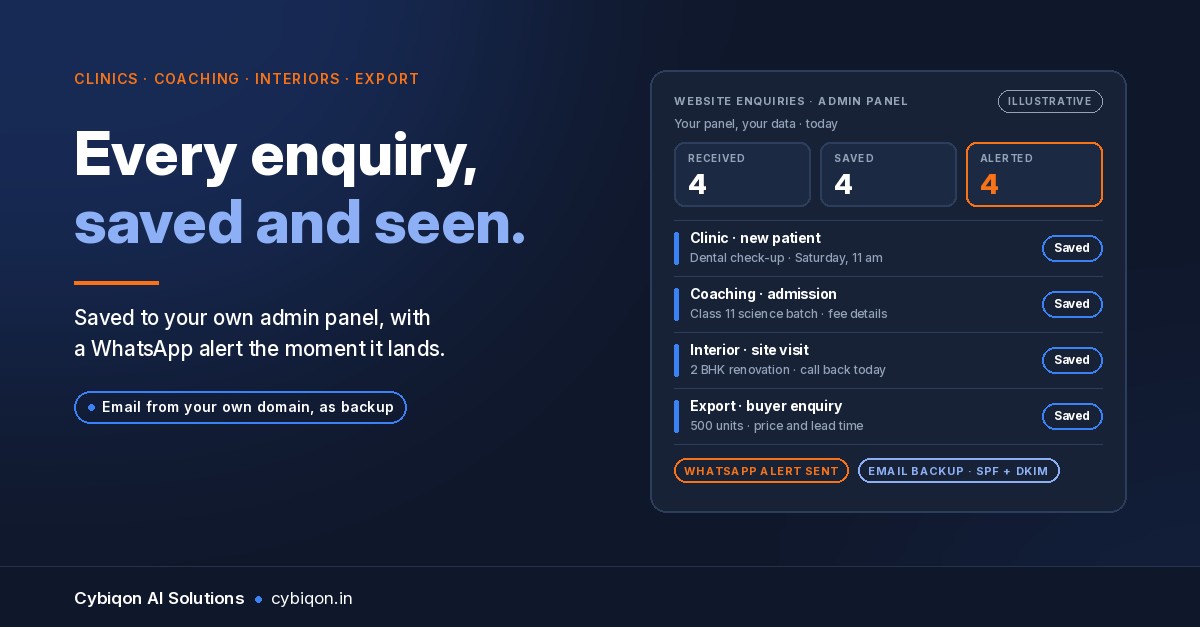
Store every submission somewhere you can see it. Each enquiry goes into a database first, then the alerts go out. You get a simple admin page listing every enquiry with name, phone, message, source page and time, plus a status such as "called" or "quote sent". If email breaks next year, the list still fills up. On WordPress, Flamingo does a basic version of this for Contact Form 7.
Get a contact form submission WhatsApp notification. The owner and the sales person get a WhatsApp message the moment someone submits, for example: "New enquiry: Rahul, 3BHK Kharadi, 98xxxxxx12". This uses a WhatsApp utility template through a provider. It costs about ₹0.12–0.15 per alert as of Nov 2026, so at, say, 300 enquiries a month it is roughly ₹41 in Meta's fees plus whatever your provider charges.
Speed matters too: a lead that waits two days has usually booked elsewhere. In a US study from 2011 (Harvard Business Review, "The Short Life of Online Sales Leads"), 2,241 companies were sent a web enquiry. 37% replied within an hour, 24% took more than a day and 23% never replied. The average among those that did reply was 42 hours.
Getting found takes plenty of effort already: the local SEO work that makes you show up on Google ahead of competitors, reviews, ads. That effort is wasted if the enquiry goes into a spam folder at the last step.
FAQs
Why are my contact form emails going to spam?
Usually it's one of three things. The form sends through unauthenticated PHP mail with no SPF or DKIM for your domain. It sends "From" the visitor's Gmail address, which fails gmail.com's DMARC policy. Or your domain has no DMARC record. Fix the From address, send through authenticated SMTP and add the three DNS records.
Should the contact form send 'From' the customer's email address?
No. Send From an address on your own domain and put the customer's address in Reply-To. Replying still works, and you stop failing the customer's email provider's DMARC check.
Do I need an SMTP plugin for WordPress contact forms?
On shared hosting, yes. WordPress uses PHP mail() by default, which hosts like Hostinger rate-limit and mailbox providers distrust. A plugin like WP Mail SMTP with a free provider such as Brevo fixes this.
Does Contact Form 7 save submissions?
Not by default. If the email fails, the enquiry is lost. Install Flamingo to store submissions, or use a form that saves to a database you control.
How do I get website form enquiries on WhatsApp?
Connect the form to the WhatsApp Business Platform through a provider and send a utility template message to your number on each submission. As of Nov 2026 it costs about ₹0.12–0.15 per alert.
Want enquiries that can't go missing?
If you'd rather not handle DNS records and plugins yourself, this is what Cybiqon would build. It's an enquiry form that saves every submission to an admin page you control, sends a WhatsApp alert to you and your sales person the moment someone enquires, and sends a backup email from your own authenticated domain. Turnstile handles the bots, so real customers don't get blocked.
It's written for your business, not configured from a template, and you own the code, the domain and every login. If you're weighing a rebuild, our honest WordPress vs custom website comparison sets out the trade-offs. New custom websites start at ₹9,999.
Not sure yet? Send us your website address and we'll submit a test enquiry and tell you where it ended up, free. Book a 30-minute call, call +91 9250711473, or email [email protected].
Conclusion
If you have contact form emails going to spam, the failure is silent. The visitor sees "Thank you" and you see nothing. Spend ten minutes on the test today. Then make the free fixes in order: From your own domain with Reply-To, authenticated SMTP, SPF, DKIM and DMARC, and a Gmail filter. After that, make sure every enquiry is saved and reaches your phone on WhatsApp, so no lead depends on email alone. And if you'd like a second pair of eyes, Cybiqon will send that first test enquiry for you.
Want this set up for your business?
Book a free call — no tech jargon, no sales pressure. Just honest answers.