Overtime calculation under the new Labour Codes: 2x rate, wage/26/8, half-hour rounding, daily vs weekly, midnight shifts, 144-hour quarterly cap and consent, OSH Rule 72 registers, and an Excel layout for eSSL biometric exports
Overtime Calculation as per New Labour Code: Formula and Excel
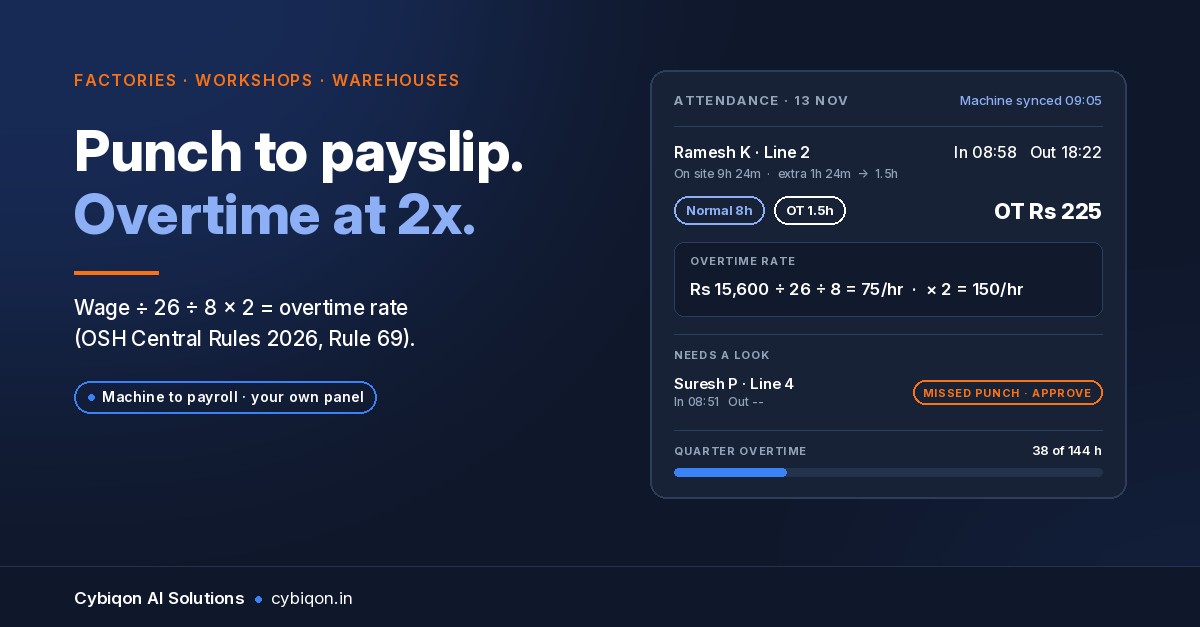
Every month, in a few thousand factory offices, someone exports the biometric machine's punches into Excel and spends two or three days turning them into overtime and salary. If you are doing that, overtime calculation as per the new labour code is now a different sum from the one most sheets still run. The rate is twice the wage, not one and a half. The hourly rate comes from dividing by 26 and then 8, not 30 and 9. Part-hours round to the half hour.
That matters at scale. The Annual Survey of Industries 2024-25 (MoSPI, released 30 September 2026) counted 2.67 lakh factories engaging 2.10 crore people, as reported by Business Today. Most of their overtime is still computed by hand.
This guide covers the calculation and nothing else: the formula with a worked example, daily versus weekly hours, night shifts that cross midnight, the quarterly cap, the registers the numbers must land in, a free Excel layout with formulas, and an honest test of when Excel is enough. For the wider Labour Code picture (wage definition, PF, gratuity, appointment letters), read our attendance and payroll guide to the 2026 Labour Codes.
This is a practical guide, not legal advice. Confirm your state's rules with your consultant.
Overtime calculation as per new labour code: the formula
The four Labour Codes came into force on 21 November 2025 (S.O. 5319(E) to 5322(E)). The OSH Code came in fully. The Code on Wages came in by listed sections, and the overtime and penalty sections (13, 14 and 54) are among them, according to K&S Partners' summary. The Central Rules followed on 8 May 2026, including the Wages (Central) Rules, 2026 (G.S.R. 343(E)) and the OSH (Central) Rules, 2026.
Under Rule 69 of the OSH (Central) Rules, 2026 and rule 3 of the Wages (Central) Rules, the formula comes down to four steps:
- Daily wage = monthly wage ÷ 26
- Hourly wage = daily wage ÷ 8
- Overtime rate = hourly wage × 2
- Overtime hours: whole hours, plus half an hour for an extra 15 to 30 minutes, or a full hour for more than 30 minutes
Overtime cannot exceed 144 hours in a quarter under Rule 69 (ziplaw.in carries the text). Section 27 of the OSH Code also makes overtime subject to the worker's consent.
Which "wage" do you start from? Not gross pay, and not always basic. "Wages" under section 2(y) of the Code on Wages means basic plus dearness allowance plus retaining allowance. If the excluded components (HRA, conveyance and the rest) exceed half of total pay, the excess is added back. That reading follows the Ministry's FAQs (March 2026), as reported. Our Labour Code payroll guide walks through the 50% test with numbers.
Overtime calculation as per new labour code: a worked example
Say a machine operator's wages are ₹15,600 a month. To keep the comparison clean, assume gross pay is also ₹15,600.
New-code method
- Daily: ₹15,600 ÷ 26 = ₹600
- Hourly: ₹600 ÷ 8 = ₹75
- Overtime rate: ₹75 × 2 = ₹150 per hour
The habit many sheets still run: gross ÷ 30 ÷ 9 × 1.5, overtime only after 9 hours
- ₹15,600 ÷ 30 = ₹520 a day
- ₹520 ÷ 9 = ₹57.78 an hour
- × 1.5 = ₹86.67 per hour
Now apply both to two real-looking days, after a full 8-hour shift:
| Extra time after 8 hours | New code: hours counted | New code: pay | Old habit: minutes past 9 h | Old habit: pay |
|---|---|---|---|---|
| 1 h 20 min | 1.5 h (20 min rounds to half an hour) | ₹225 | 20 min | ₹28.89 |
| 1 h 40 min | 2 h (40 min rounds to a full hour) | ₹300 | 40 min | ₹57.78 |
The gap on one day is ₹196 to ₹242 for one worker. Repeat that over 80 workers and a month of late shifts, and you are into the territory section 54 of the Code on Wages was written for: a fine of up to ₹50,000 for paying less than is due, and on a repeat within five years, up to three months in jail or a fine of up to ₹1 lakh.
Is overtime after 8 or 9 hours under the new labour code?
Eight. No provision in the Codes or the Central Rules uses 9 hours as the overtime trigger, even though some ranking pages still say it does. The normal day is 8 hours and the normal week is 48 hours (Wages Central Rules, rule 5).
Rule 69 frames the trigger in two ways:
- More than 8 hours in a day, for daily-wage workers
- More than 48 hours in a week, for others
Section 27 of the OSH Code adds the tie-breaker: overtime is counted on the daily or the weekly basis, whichever is more favourable to the worker.
The safe practice is to compute both and pay the higher:
- Daily method: add each day's overtime past 8 hours, rounded as above.
- Weekly method: total hours for the week minus 48.
A worker who does 10 hours on Monday and 6 on Tuesday has 2 overtime hours on the daily method, even if the week totals under 48. A worker who does 8 hours a day for seven days has none on the daily method and 8 on the weekly one. Your sheet needs both columns. Keep in mind that the weekly holiday must be 24 consecutive hours, counted from the end of a shift.
Night shift after midnight: which day do the hours belong to?
Take a 10 pm to 6 am shift. The worker punches in on Tuesday and out on Wednesday. Under section 28 of the OSH Code and rule 7 of the Wages Central Rules, the hours after midnight count to the day the shift started. All eight hours are Tuesday's.
That sounds obvious, but this is where most spreadsheets break:
- The biometric export lists an in-punch on one date and an out-punch on the next. Excel treats them as two half-days.
- An out-punch of 06:00 minus an in-punch of 22:00 gives a negative number.
- Someone fixes it by hand, in their copy only.
The fix is to store full date-times (not times alone) and to tag every punch pair with a shift date equal to the in-punch date. Overtime, the weekly total and the weekly holiday are then all counted against the shift date. The Excel layout below does exactly that.
Consent and the 144-hour quarterly cap
Two rules that a pay-per-hour sheet does not even see:
- Consent. Section 27 makes overtime subject to the worker's consent. Keep a dated record: a signed sheet, a form in the attendance system, anything an inspector can see. A WhatsApp "ok sir" in a supervisor's phone is not a register.
- 144 hours per quarter. Rule 69 caps overtime at 144 hours a quarter. That works out to an average of 48 a month, but the cap is quarterly, so one heavy month can be fine and three heavy months will not be. You need a running total per worker that crosses month-end files.
Central or state rules? The Central Rules apply where the Centre is the "appropriate government". Most private factories fall under their state's OSH and Wages rules, and the thresholds and the quarterly cap can differ. In a Lok Sabha reply on 20 July 2026, Minister of State Shobha Karandlaje said most states had finalised or pre-published their rules (reported by Upstox). Check your own state's notification before you hard-code 144.
Which registers do the overtime numbers go into?
Rule 72 of the OSH (Central) Rules, 2026 lists the registers, which may be kept electronically for 5 years:
| Register | What it holds for overtime |
|---|---|
| Employee Register (Form XIII) | Who the worker is, joining date, designation |
| Attendance Register-cum-Muster Roll (Form XIV) | Daily in and out times, and a monthly overtime total |
| Register of Wages, Overtime and Deductions (Form XV) | Days worked, total overtime hours, overtime amount, deductions, net pay, payment date or transaction ID |
| E-wage slip (Form XVI) | Issued on or before the pay day |
The Wages (Central) Rules carry parallel forms: Form I, Form IX (muster roll) and Form IV (wages and overtime), under rule 51.
Note what the forms do not demand: a per-day split of normal and overtime hours. Form XIV wants daily times and a monthly overtime figure. Keeping the per-day split is still good practice, because it is the only way to show how the monthly total was reached when someone questions it.
For records lapses, section 54 sets a fine of up to ₹10,000. Under section 54(3), the inspector first issues a written notice to put things right. That notice is your last chance to make the sheet match the register.
Overtime calculation in Excel from biometric attendance
Most factories on an eSSL machine run eTimeTrackLite. According to the eTimeTrackLite manual (versions differ), it offers three overtime formula options, an OT register, manual punch entry, a missed-out-punch report, and Excel/CSV export, including export in a third-party payroll format. It does not do salary calculation or produce the statutory wage registers. So the salary calculation from biometric attendance happens in Excel, after export.
Here is a free layout for overtime calculation in Excel, one row per worker per shift. Export punches with full date and time.
| Col | Field | Formula (row 2) |
|---|---|---|
| A | Worker ID | from export |
| B | In (date + time) | from export |
| C | Out (date + time) | from export; fix missed punches here and note who approved |
| D | Shift date | =INT(B2), formatted as a date |
| E | Hours worked | =(C2-B2)*24, minus any unpaid break |
| F | Normal hours | =MIN(E2,8) |
| G | OT raw minutes | =MAX(0,ROUND((E2-8)*60,0)) |
| H | OT rounded hours | =INT(G2/60)+IF(MOD(G2,60)>30,1,IF(MOD(G2,60)>=15,0.5,0)) |
| I | Monthly wage | =VLOOKUP(A2,Wages!A:B,2,0) |
| J | Hourly rate | =I2/26/8 |
| K | OT amount | =H2*J2*2 |
Then add two summary sheets:
- Weekly check: with
SUMIFSon hours worked by worker and week of shift date, weekly OT =MAX(0, total − 48). Compare it with the sum of column H for that week and pay the higher. - Quarter tracker:
SUMIFSof paid OT hours by worker and quarter, with conditional formatting that turns red at 140 and stops at your state's cap.
Because column C holds the full date of the out-punch, a 22:00 to 06:00 shift returns 8 hours, not a negative number, and column D pins it to the day it started. Rule 69 only speaks to remainders of 15 to 30 minutes and over 30, so if you want to pay remainders under 15 minutes too, change column H and check your state rules.
Where Excel breaks, and when a panel is worth building
Say, as an illustration, an 80-worker auto-components workshop in Pune runs two shifts on one eSSL machine. Each month the accountant spends 2 to 3 days in Excel. She adds out-punches that supervisors approved on WhatsApp, marks half-days and late marks, splits the 10 pm to 6 am shift at midnight, and computes overtime as gross ÷ 30 ÷ 9 × 1.5. Every correction lives only in her copy.
Nothing in that routine is careless. It breaks because of how it is built:
- Missed punches are fixed with no trail. The approval is in a chat, and the change is in a cell.
- Formulas drift. One row with a typed number instead of a formula, copied down, and a month is wrong.
- The quarter crosses three files. Nobody sees the 144-hour cap until it has been passed.
- Consent sits somewhere else, if it exists at all.
- Five years of registers means 60 workbooks that must all agree with the bank statements.
If several of those sound familiar, that's one of the clearer signs your business has outgrown Excel.
Excel plus discipline is enough when you run one day shift, there is no midnight crossing, missed punches are rare, one person owns the sheet, and you use the layout above with locked formula columns.
A panel is worth building when you run two or more shifts, a night shift crosses midnight, missed-punch corrections run to dozens a month, you have more than one machine or site, or overtime has to tie back to a production plan that schedules the extra hours in the first place.
FAQs
How is overtime calculated under the new labour code?
Divide the monthly wage by 26 for the daily wage and by 8 for the hourly wage, then pay twice that for each overtime hour. Count 15 to 30 extra minutes as half an hour and more than 30 as a full hour (OSH Central Rule 69; Wages Central Rules, rule 3).
Is overtime 8 or 9 hours a day?
8 hours. Overtime is due for work beyond 8 hours a day or 48 hours a week, on whichever basis is more favourable to the worker (OSH Code s.27). No Code or Central Rule sets a 9-hour trigger.
What is the maximum overtime per quarter?
144 hours under Rule 69 of the OSH (Central) Rules, 2026. Private factories usually follow their state's rules, which can set a different figure, so check your state's notification.
Is overtime calculated on basic or gross salary?
Neither exactly. It is calculated on "wages" under section 2(y): basic plus DA plus retaining allowance, with the excess added back if excluded allowances are more than 50% of total pay.
Does eTimeTrackLite calculate salary?
Not according to its manual. It calculates overtime hours, keeps an OT register and exports to Excel, CSV or a payroll format. It does not calculate salary or produce statutory wage registers.
What Cybiqon would build for this
For a factory where Excel has stopped being enough, Cybiqon would build an attendance-to-payroll admin panel. It reads your eSSL or ZKTeco logs directly, from the device, its database or a CSV. It applies your factory's rules: 2× pay, the 26 and 8 divisors, half-hour rounding, midnight shifts pinned to the start date, the quarterly cap and a consent record. Missed-punch corrections go through approval inside the panel, so each change has a name and a date. It prints the muster roll, the wage and overtime register and the e-wage slips, and keeps them for five years.
It is written for your shifts and your state's rules, not configured from a template. You own the code, and the founders build it. Book a 30-minute call, call +91 9250711473 or write to [email protected].
Conclusion
Overtime calculation as per the new labour code comes down to five things: wages ÷ 26 ÷ 8, then twice that rate, an 8-hour day or 48-hour week (whichever pays the worker more), half-hour rounding, and hours pinned to the day the shift started. Keep it inside the quarterly cap, with consent on record, and make sure it lands in the muster roll and the wage register. Use the Excel layout above if one person and one shift can keep it clean. When the corrections and the midnight shifts outgrow the sheet, Cybiqon can build you a panel you own.
Want this set up for your business?
Book a free call — no tech jargon, no sales pressure. Just honest answers.
What we build for this: Admin panels & internal tools