Reading receivables ageing analysis in TallyPrime for a distributor
Ageing Analysis in Tally Prime: Why Your 90+ Days Figure Lies
Indian businesses take 73 days on average to pay an invoice, even though 82.6% of invoices are raised on 0–30 day terms. That comes from Recordent's 2026 receivables report on about 1.1 lakh businesses, and Recordent's reading is blunt: the problem is collection discipline, not generous credit. For a distributor, discipline starts with one report, the ageing analysis in Tally Prime. Most owners only see it when the accountant prints it.
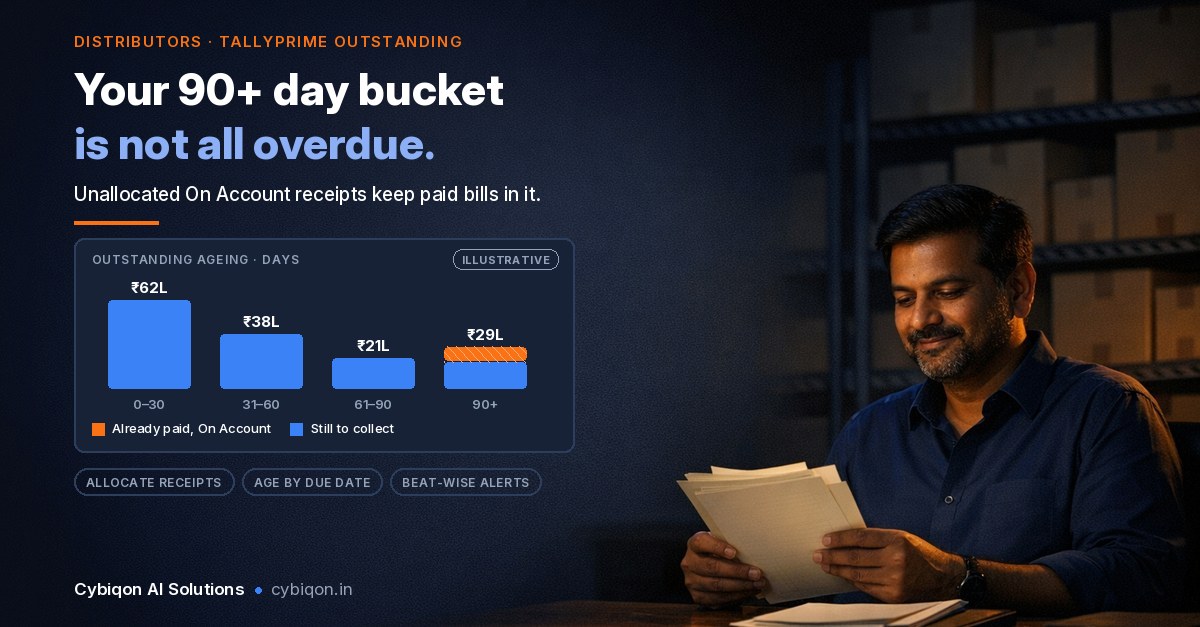
Picture a distributor with ₹1–3 crore spread across 200-plus retailer accounts. The printed ageing says ₹38 lakh is sitting in "90–180 days". Some of that is genuinely stuck. Some of it was paid weeks ago and never knocked off the right bill. Some of it belongs to dealers on 45-day terms who aren't actually late. The report looks precise, but it isn't.
Festive credit is going out now. Diwali falls on Sunday 8 Nov 2026, so bills raised on 30–45 day terms in late October and early November fall due between late November and December. This guide covers:
- where the receivables ageing report actually lives in TallyPrime
- ageing by bill date vs due date, and which one to use
- how to change the ageing slabs
- the three entry habits that make the report lie
- a dated clean-up checklist, and when an outstanding dashboard on your phone is worth building
Where is ageing analysis in Tally Prime? (Receivables, not stock)
Search for "ageing analysis in Tally" and half the results are about stock ageing. The rest describe the old Tally.ERP 9 path, Display > Statements of Accounts > Ageing Analysis under MIS reports. That menu item does not exist in TallyPrime. In TallyPrime, receivables ageing lives inside the outstanding reports.
According to Tally's help page on managing receivables (updated 1 Oct 2026), the path is:
Gateway of Tally > Display More Reports > Statements of Accounts > Outstandings > Receivables / Payables / Ledger / Group
For a distributor, the most useful view is Group Outstandings for Sundry Debtors:
- Ledger-wise (F5): one line per retailer, showing total pending
- Bill-wise (Ctrl+F8): every open invoice for every retailer
- Ageing: press F6 to choose the ageing method (bill date or due date) and set your own periods. Key labels shift slightly between Tally versions and help pages, so look for the ageing option on the right-side button bar if F6 looks different on your screen.
- Overdue only: Tally documents an Overdue Receivables view (Alt+G) and a Basis of Values setting (F12) to show only overdue bills
One prerequisite: bill-wise details must be enabled on each debtor ledger (F11 features, then the ledger's "Maintain balances bill-by-bill" setting). If a retailer's ledger was created without it, that retailer simply won't age.
TallyPrime 7.2, released on 12 Oct 2026, added GSTR-9 export, PO templates and 30-day e-invoice sessions. It changed nothing in outstandings or ageing, so everything below applies to the current release.
Ageing analysis in Tally Prime: bill date vs due date
This is the setting that matters most, and most printed reports get it wrong for collections.
| Ageing by bill date | Ageing by due date | |
|---|---|---|
| Counts days from | Invoice date | Invoice date + that party's credit period |
| A 15-day dealer, 40 days after the bill | Shows as 0–45 | Shows as 25 days overdue |
| A 45-day dealer, 40 days after the bill | Shows as 0–45 | Not yet due |
| Good for | Auditors, bank stock statements, the "strict" view | Collections, salesman follow-up, the "fair" view |
Tally's own distributor guide (13 May 2026) frames it the same way: bill date is the auditor's strict view and due date is the collections view.
The trap is mixed credit terms. A typical FMCG or electrical distributor gives a counter-heavy kirana 15 days and a large modern-trade account 45. Bill-date ageing treats them as identical, so the late 15-day dealer hides in the same bucket as the 45-day dealer who isn't due yet.
Due-date ageing only works if each ledger carries its real credit period. Set the default credit period on the retailer's ledger. If you also want TallyPrime to warn before an over-limit order ships, the same ledger screen holds the credit limit in Tally Prime, and it's worth setting both in one sitting.
How to change the ageing period (slabs) in TallyPrime
Tally's vendor pages document the default slabs as 0–45, 45–90, 90–180 and >180 days. For a business that sells on 30-day terms, that is a poor fit:
- a bill 10 days overdue and a bill 40 days overdue sit in the same 0–45 bucket
- you never see a 30–60 band, which is where a late payment is still recoverable with one phone call
- everything past six months collapses into ">180", where very different problems get lumped together
To change the ageing period in TallyPrime, open Group Outstandings for Sundry Debtors, press F6 to choose the ageing method, and enter your own periods. A sensible set for a distributor on 15–45 day terms is:
- 0–30 (current or just due)
- 31–60 (salesman follow-up)
- 61–90 (owner calls)
- 90+ (hold supply, review the account)
That ">180" bucket deserves a second look. Recordent's 2026 report found the average business carries ₹3.83 crore in receivables unpaid for more than 360 days. That money sits in Tally's default ">180" bucket, mixed in with bills that are merely seven months old. If you have old balances, add a 180–365 and a 365+ slab once a quarter so the near-dead money is visible on its own.
Why the outstanding report in Tally Prime doesn't match the ledger balance
The most common question about the outstanding report in Tally Prime is why its bill-wise total differs from the ledger balance. Usually the cause isn't a Tally bug. It's how entries were made. Three habits do most of the damage.
1. Receipts entered "On Account"
The salesman collects ₹85,000 by UPI from a Jaipur retailer and doesn't say which bills it covers. The accountant enters the receipt On Account. That's how bill-wise accounting works: the money reduces the ledger balance, but no invoice is marked paid. So the old invoices keep ageing into 90+, and the ageing report shows a "defaulter" who has actually paid. Tally's guides name On Account as the main cause of the bill-wise vs ledger mismatch and say it should be adjusted manually.
Fix: open the receipt, change the allocation to Agst Ref, and pick the bills it actually settles. If you can't tell which bills a lump-sum UPI payment covers, the three methods in matching customer payments to invoices in Tally will help.
2. Scheme and rate-difference credit notes left open
Tally's sales-return help says to use Agst Ref when the return comes before payment and New Ref when the customer has already paid. Problems start when a scheme credit note or rate-difference note against a still-open invoice gets entered as New Ref. The invoice stays fully open and keeps ageing, while a separate credit sits unused. Adjust it against the invoice it relates to.
3. One credit period for everyone
Covered above: without per-ledger credit periods, due-date ageing has nothing to work with.
Clean these three up and the 90+ figure shrinks to the bills that are genuinely overdue. That number is smaller, but it's the real one, and it's the list your salesmen should be carrying.
How to see overdue receivables and salesman-wise outstanding in Tally
Once the data is clean, getting overdue receivables in TallyPrime is straightforward. Switch Group Outstandings to due-date ageing, or use the Overdue Receivables / overdue-bills basis described above. You can also open the bills receivable report from the same Outstandings menu.
The harder question is the one owners actually ask: whose beat holds the 90-day money?
TallyPrime lets you record salespersons as Cost Centres, and Tally's salesperson help documents a Cost Centre Breakup of Ledger that shows per-party totals. That gives you cost centre wise outstanding totals. It does not give you a documented salesman-wise ageing report, meaning buckets by salesman or by beat. That isn't available out of the box. Your options are:
- TDL customisation: a Tally partner writes a custom report
- A workaround: create a sub-group per beat under Sundry Debtors, such as "Debtors – Beat 3 Andheri", and run Group Outstandings on each sub-group. This is our suggestion, not a Tally feature. It works for beats but gets messy when salesmen swap routes.
- An external view that reads Tally and does the grouping itself (more on this below)
Without one of these, someone builds an Excel every Monday, and by Thursday it's already stale.
A clean-up checklist before festive bills fall due
None of this needs new software. It needs about two weeks of the accountant's attention, scheduled before the festive money comes due.
By Saturday 31 Oct 2026
- Turn on bill-wise details for every debtor ledger that's missing them
- List every on account entry in Tally Prime for the last six months, and allocate each one Agst Ref with the salesman's help
By Sunday 8 Nov 2026 (Diwali)
- Re-link open scheme and rate-difference credit notes to their invoices
- Set the real credit period on every active retailer ledger
- Save a due-date ageing view with 0–30 / 31–60 / 61–90 / 90+ slabs
From Monday 23 Nov 2026, every Monday
- Print or export the overdue list, split by beat, and hand it to each salesman
- Send reminders for anything in 31–60. A Tally payment reminder on WhatsApp gets read faster than a printed statement.
- Escalate 61–90 to the owner and put 90+ accounts on supply hold
One misconception to drop: the MSMED Act's 45-day payment rule and the Sec 43B(h) tax disallowance protect micro and small suppliers, mainly manufacturers and service providers. A distributor's receivables from retailers generally aren't covered, and MSME Samadhaan isn't the route for them either. Your leverage is credit discipline: due dates, supply holds and steady follow-up. Our guide to chasing a delayed payment in India covers the escalation steps once a bill is truly stuck.
When an outstanding dashboard on your phone is worth building
Once the clean-up is done, Tally gives you an accurate receivable ageing report. It still doesn't give you:
- ageing by salesman and by beat without TDL or sub-group workarounds
- promised payment dates, where a retailer said "Saturday" and someone has to remember to check
- alerts when a retailer crosses 60 or 90 days, instead of finding out at the month-end print
- the owner seeing all of this on a phone at 9 pm, without calling the accountant
Several apps already put Tally reports on mobile, and if a standard outstanding view is all you need, one of those is enough. A custom build makes sense when your own rules matter: your beat structure, your promised-date follow-up, your escalation ladder, and code you own.
Technically, TallyPrime can act as a server. It answers XML requests over HTTP (port 9000 by default), and it has ODBC. TallyPrime 7.0 added native JSON alongside XML. A dashboard can therefore read your outstanding bills live from your own Tally. The catch is that Tally must be running with the company loaded on a reachable machine, either an always-on office PC or Tally on cloud. If the accountant shuts the PC at 7 pm, the dashboard goes dark at 7 pm.
FAQs
How do I see ageing analysis in TallyPrime?
Go to Gateway of Tally > Display More Reports > Statements of Accounts > Outstandings > Group, select Sundry Debtors, and press F6 to choose ageing by bill date or due date and set your periods. TallyPrime has no separate "Ageing Analysis" menu. That was the old Tally.ERP 9 path.
What is the difference between ageing by bill date and ageing by due date in Tally?
Bill-date ageing counts days from the invoice date. Due-date ageing counts from the invoice date plus that party's credit period. Bill date suits audits. Due date suits collections, especially when dealers are on different terms.
Why does my Tally outstanding report not match the ledger balance?
Usually it's receipts entered On Account, or credit notes not adjusted against their invoices. The ledger balance falls, but the bills stay open in the bill-wise report. Re-allocate those entries Agst Ref.
Can I see salesman-wise outstanding in TallyPrime?
You can see per-party totals by salesperson if salespersons are recorded as Cost Centres. A salesman-wise or beat-wise ageing report isn't available out of the box. It needs TDL, a sub-group per beat as a workaround, or an external view reading Tally.
How do I get Tally outstanding reports on mobile?
Use a Tally-on-mobile app for standard reports, or build a dashboard that reads your Tally over XML/JSON. Either way, Tally must be running on an always-on machine or on cloud.
What Cybiqon would build for this
If you've done the clean-up and still can't answer "which salesman's beat holds the 90-day money" without an Excel, that's the gap Cybiqon fills. We would build an outstanding dashboard on your phone that reads live from your own Tally. It would show due-date ageing by salesman and beat, promised payment dates your salesmen log from the field, and alerts when a retailer crosses 60 or 90 days. It is written around your credit terms and your beats rather than configured from a template, and you own every line of the code.
You can read what goes into a build like this on our admin panels and internal tools page. Or book a 30-minute call and bring your last ageing printout. You can also reach us at +91 9250711473 or [email protected].
Conclusion
The ageing analysis in Tally Prime is only as honest as the entries behind it. Age by due date, give every retailer ledger its real credit period, use slabs that match your terms, and allocate every On Account receipt and open credit note before the festive bills fall due after 8 Nov 2026. That clean-up costs nothing and shows you who actually owes what. If you then need that view by salesman and beat on your phone, Cybiqon can build it on top of your own Tally.
Want this set up for your business?
Book a free call — no tech jargon, no sales pressure. Just honest answers.
What we build for this: Admin panels & internal tools