Physical stock voucher in TallyPrime: reconciling a distributor's godown count with book stock, negative stock, GST on shortages, and an owned count app
Physical Stock Voucher in Tally Prime: Fix the Count Gap First
Physical Stock Voucher in Tally Prime: Fix the Count Gap First
Diwali was on 8 Nov. The godown count is done, the count sheets are stapled together, and the totals still don't match Tally's Stock Summary. Some items are short, some are in excess, and a few show negative stock even though the cartons are sitting right there on the rack.
The fast fix is to pass one physical stock voucher in Tally Prime and make the books equal the count. Hold on before you do. On 19 Nov 2026 the GST Appellate Tribunal at Prayagraj upheld tax on a steel dealer's unexplained 5.3-tonne shortage found at an inspection (LiveLaw Biz). A shortage you can't explain is not just an accounting tidy-up.
This guide is for the owner or accountant of an FMCG, pharma, hardware or paint distributor with 500 to 3,000 SKUs in one to three godowns. It covers why the numbers drift, the order to fix them in, the exact TallyPrime steps, what an unexplained shortage means under GST, and when a phone count app that posts back to Tally is worth having.
Difference between book stock and physical stock
Book stock (also called system stock) is what Tally thinks you have: opening stock plus purchases, minus sales, plus or minus every inventory voucher. Physical stock is what your team counts on the racks. In a perfect world they match. They almost never do.
You are not unusual. In a well-known study of about 370,000 inventory records across 37 stores of one US retailer, 65% of the records did not match what was on the shelf, and around 20% were off by six units or more, even though the retailer ran perpetual inventory software (DeHoratius and Raman, Management Science, 2008). That is a global benchmark from US retail, not an Indian figure, and no comparable Indian study exists. But the point carries: software does not keep records right by itself.
The second useful number, also US-only: the National Retail Federation's 2023 security survey attributed 27.29% of retail shrink to process and control errors (NRF). More than a quarter of "missing" stock is paperwork, not theft.
For a distributor, the usual causes of the gap between physical stock vs system stock are:
- Bills raised before the purchase entry. Goods arrived, the salesman billed them out, and the purchase bill was entered three days later. Tally shows negative stock in the meantime.
- Sales billed from the wrong godown or batch. Godown A goes negative, godown B shows phantom excess.
- Scheme and free goods never entered. The "10+1" cartons left the godown but no voucher says so.
- Returns and damage not booked. Goods came back from retailers and sit in a corner, outside the books.
- Unit-of-measure mistakes. A case of 24 billed as 24 cases, or the reverse.
- Van stock. Goods loaded on a delivery van are neither in the godown nor sold.
Each is an entry error with a fix. Only what is left afterwards is a real loss.
Why Tally shows negative stock, and how to find it
Negative stock in Tally Prime almost always means one of two things, according to Tally's own help: the sale was allocated to the wrong godown or batch, or the sale was billed before the purchase or inward entry was passed. Once you pass the missing purchase, the item drops out of the negative stock report on its own (TallyHelp, Stock Summary FAQ).
To see which items are negative:
- Negative stock report in Tally Prime: press Alt+G (Go To) and type Negative Stock. Tally documents the full menu path only for Tally.ERP 9, so searching by name is the reliable way in TallyPrime.
- Items that went negative on any day: Gateway of Tally > Display More Reports > Analysis & Verification > Data Analysis > Verification of Stock Items, then the Daily Negative Stock option (F10 in the current help; keys vary between releases) (TallyHelp).
The second report matters: an item positive today may have gone negative for four days last week, which points straight at bills raised ahead of their purchase entry.
Can you stop it happening? Partly. In a sales voucher, F12 (Configure) has a "Warn on Negative Stock Balance" setting. It only warns; it does not block the bill. Blocking negative billing outright needs a TDL customisation.
On negative stock adjustment in Tally Prime: don't "adjust" a negative item with a physical stock entry until you have checked for a pending purchase. Overwriting it hides the missing purchase, and then the supplier's bill, the ITC claim and the stock all disagree.
Physical stock verification procedure for 500–3,000 SKUs
A weekend wall-to-wall count works for one small godown. Past a thousand SKUs, tired people miscount. Two approaches work better.
1. Freeze billing, then count. Pick a cut-off: say, after the last bill on Saturday evening. Tally Solutions' own post-Diwali checklist recommends a count sheet with item code, system quantity and physical quantity, a clear cut-off rule, and counting damaged and return-pending stock separately (Tally Solutions, 26 Oct 2026).
2. Cycle count by rack or brand. Instead of everything at once, count a slice every week: brand A this Monday, racks 1–10 next Monday. Fast movers and high-value lines (a paint distributor's 20-litre tins, a pharma distributor's cold-chain items) get counted more often. Over a month or a quarter, every SKU gets counted at least once, and the business never stops billing.
Practical rules that apply either way:
- Export the count sheet from Tally. Open Stock Summary, go godown-wise, and export to Excel. Add a "Physical qty" and a "Reason" column.
- Count in the billing unit. If Tally bills in pieces, count pieces, not cases.
- Keep damaged, expired and return-pending stock in a separate pile and a separate sheet. Don't mix it into saleable stock.
- Note van stock and goods in transit at the cut-off time.
If the count sheet lives in a shared Excel file that three people edit, you will recognise the problems in our post on the signs your business has outgrown Excel.
Before the physical stock voucher in Tally Prime: fix the causes
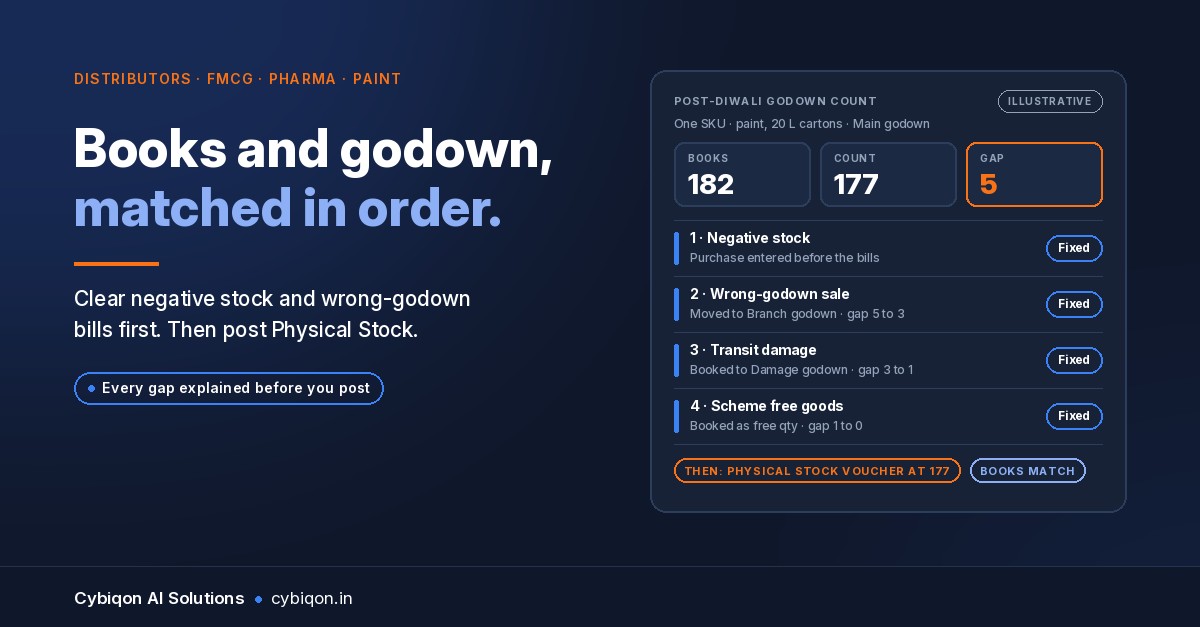
This is the step most tutorials skip. Work through the variance list in this order and the voucher at the end becomes small and explainable. A Chartered Management Accountant answering a real query on CAclubindia (books showed ₹15 lakh, the count showed ₹10 lakh) gave the same advice: trace each difference to a cause first; excess usually means a missing purchase entry or double-booked consumption, and shortage may be a duplicate purchase or a missing sale (CAclubindia Experts).
| Order | Cause | What to do in TallyPrime |
|---|---|---|
| 1 | Pending purchase bills | Enter them with the correct dates. Negative items clear by themselves. |
| 2 | Sales from wrong godown or batch | Correct the godown/batch allocation in the sales voucher, or move it with a Stock Journal transfer. |
| 3 | Scheme / free goods | Enter the free quantity on the sales invoice or as the scheme voucher your setup uses. |
| 4 | Returns not booked | Pass the credit notes (sales returns) with quantity. |
| 5 | Damage and expiry | Book it properly, not as a "shortage". |
| 6 | UoM errors | Correct the original voucher. |
| 7 | What's left | Physical Stock voucher for the residual, reason in the narration. |
If dozens of purchase bills are pending after the festive rush, keying them one by one takes days. Our guide to importing vouchers from Excel into TallyPrime covers the import route.
For step 5, damaged and expired goods have their own entries, brand claims and GST treatment. We cover them in detail in our post on damage and expiry stock, so they are not repeated here.
Only post the physical stock voucher after all pending bills and corrections are in. Post it first and every later correction pushes the books away from the count again.
How to pass a physical stock voucher in Tally Prime
Here is the physical stock entry in Tally Prime, as current TallyPrime help gives it (TallyHelp, Update Physical Stock):
- Press Alt+G (Go To) > Create Voucher.
- Press Ctrl+F7 to select Physical Stock.
- Press F2 and set the date to the count date (the cut-off).
- Select the stock item, then the godown and batch where applicable.
- Enter the counted quantity.
- Write the reason in the narration: "Shortage, count 23 Nov 2026, rack 4, reason not traced" is far more useful than "stock adjustment".
- Press Ctrl+A to save.
Shortcut history, because older guides confuse people: Ctrl+F7 is the shortcut in current TallyPrime help; older TallyPrime releases put Physical Stock under F10 (Other Vouchers); Tally.ERP 9 used Alt+F10.
To review what you posted, press Alt+G and type Physical Stock Register (TallyHelp). With reasons in the narration, this register becomes your audit trail.
One caution. Tally's ERP 9 help says the quantity in a physical stock voucher is treated as the actual stock from that date, and later transactions build on that balance (TallyHelp, ERP 9). How items you leave out of the voucher are treated is something to test in a copy of your company before you rely on it. Take a backup, restore it as a test company, post a sample voucher, and check the Stock Summary.
Difference between physical stock and stock journal
Tally's Stock Items FAQ puts it simply: use a Physical Stock voucher when only the quantity changes; use a Stock Journal when both quantity and rate (value) change (TallyHelp, Stock Items FAQ).
| Physical Stock voucher | Stock Journal | |
|---|---|---|
| What it records | Counted quantity on a date | Goods going out and coming in, with value |
| Changes value directly? | No, quantity only | Yes, quantity and rate |
| Godown transfers | No | Yes |
| Best for | The residual after a count | Wrong-godown fixes, repacking, conversions |
So: wrong-godown sales get a Stock Journal transfer (or a corrected sale); the count residual gets a Physical Stock voucher.
Unexplained shortage: GST, bank and audit consequences
This section is general information, not legal or tax advice. Confirm the treatment for your business with your CA.
ITC reversal on stock. Section 17(5)(h) of the CGST Act blocks input tax credit on goods lost, stolen, destroyed or written off. If a shortage is genuinely unexplained and you write it off, the ITC on it generally has to be reversed. Circular 170/02/2022-GST says such reversals go in Table 4(B)(1) of GSTR-3B (CBIC circular). Timing errors you have traced and fixed are not losses.
If an officer finds the gap first. Section 35(6) lets the officer treat goods not accounted for as if they were supplied, with tax decided under Sections 73 or 74. In Raj Trading Company, GSTAT Prayagraj looked at books showing 182.733 MT against 177.433 MT in the godown. It upheld tax on the unexplained quantity shortage, but struck down the part treating a stock-valuation difference as suppressed sales, cutting the confirmed liability from ₹13,97,074 to ₹3,47,826. In the tribunal's words, as quoted by LiveLaw: "A difference between two valuations of the same stock is a difference in valuation, and it is not a sale."
On 1 Sep 2025 the Supreme Court dismissed the Revenue's appeal in Dayal Product: Section 130 confiscation can't be used for stock discrepancies found in a survey of a registered dealer; the route is Sections 73/74 (CAclubindia). That still means tax, interest and penalty.
Bank and audit. If you are a company covered by CARO 2020, the auditor reports physical verification discrepancies of 10% or more in a class of inventory, and where working-capital limits exceed ₹5 crore, whether the quarterly stock statements filed with the bank agree with the books (ICAI BoS). Even outside CARO, a distributor on a CC limit files stock statements from Tally. Wrong book stock means a wrong statement.
Stock verification app for Tally: buy or build?
Paper count sheets breed errors: misread handwriting, a missed row, a case counted as a piece. A phone barcode count fixes much of that. Two routes:
Off-the-shelf. Cleverence sells a mobile barcode add-on that posts count variances to Tally as Physical Stock or Stock Journal vouchers. It is listed from $58 per device per month (Standard) and $69 (Advanced) on the vendor site as of Nov 2026 (Cleverence). Three phones on Standard come to about $2,088 a year, every year.
Owned app. A custom Android app built around your godowns: it pulls the count sheet from Tally, lets staff scan rack by rack or brand by brand, asks for a reason code on every variance (damage, return, wrong godown, scheme, UoM), and posts the residual back as Physical Stock vouchers with that reason in the narration.
| Off-the-shelf add-on | Owned app | |
|---|---|---|
| Cost pattern | Per device, per month | One-time build |
| Fits your reason codes and godowns | As configured | Written for them |
| Code ownership | Vendor's | Yours |
| Time to start | Days | Weeks |
If you count once a year with two people, the add-on or even a clean Excel sheet is enough. If you run weekly cycle counts across three godowns, with field staff on phones already (perhaps using a salesman order booking app linked to Tally), owning the tool starts to make sense.
FAQs
How do I pass a physical stock voucher in TallyPrime?
Alt+G > Create Voucher > Ctrl+F7 (Physical Stock). Set the count date with F2, select item, godown and batch, enter the counted quantity, add the reason in the narration, and save with Ctrl+A.
Physical stock voucher vs stock journal?
Physical Stock when only quantity changes; Stock Journal when quantity and rate change, or for godown transfers.
Why does Tally show negative stock?
A sale billed before its purchase entry, or allocated to the wrong godown or batch. Passing the missing purchase clears it.
Post the physical stock voucher before or after entering pending bills?
After. Enter every pending purchase, return and correction first, so the voucher only records the genuine residual.
Reverse ITC if stock is short?
For a genuinely unexplained shortage written off, Section 17(5)(h) generally requires ITC reversal, reported in GSTR-3B Table 4(B)(1) per Circular 170/02/2022-GST. Confirm with your CA.
What Cybiqon would build for your godowns
If your count is a weekend of paper sheets and a variance list nobody can explain, Cybiqon can build you an Android count app for your godowns. Staff scan against a count sheet pulled from TallyPrime, every variance gets a reason code, and the residual posts back to Tally as Physical Stock vouchers with the reason in the narration. It is written for your godowns, units and brands, not configured from a template, and you own every line of the code. There is no per-device monthly fee.
Our Android app builds are listed from ₹29,999 one-time, scoped per build. Send us your negative stock list and one count sheet, and on a 30-minute call we'll show you what the app would look like for your setup. Or reach us at +91 9250711473 or [email protected].
Conclusion
A godown count that doesn't match Tally is normal. What matters is what you do next. Fix pending purchases first, then wrong-godown sales, scheme goods, returns and damage, and only then pass a physical stock voucher in Tally Prime for what is genuinely left, with the reason written down. That keeps your Stock Summary, your bank stock statement and your GST position starting from the same honest number. If you want the count itself on a phone instead of paper, Cybiqon is happy to talk it through.
Want this set up for your business?
Book a free call — no tech jargon, no sales pressure. Just honest answers.
What we build for this: Android apps